

Can you see who shared your Instagram post? As we navigate the ever-changing landscape of social media in 2026, this remains the number one question asked by creators and everyday users alike. With over 2 billion active users scrolling daily, understanding your Instagram engagement metrics is more critical than ever.
- The 5 Types of Instagram Shares Explained
- How to See Who Shared Your Instagram Post or Reel to Their Story
- Unlocking the Professional Dashboard: Check Your Total Share Count
- Can I See Who Shared My Instagram Post in DMs? (The “Dark Social” Truth)
- Reel Remixes: The Visible Way Users “Share” Your Video
- Safe Analytics Tools vs. Dangerous Third-Party Apps
- Why Can’t I See Who Shared My Instagram Post? (Troubleshooting)
- Frequently Asked Questions
The short answer is yes, but only under specific circumstances. You can see exactly who shared your content to their public Instagram Story, but this data vanishes after 24 hours. You cannot see the identities of users who share your posts privately via Direct Messages (DMs) or external links. However, by utilizing your Professional Dashboard, you can see the exact Instagram share count to track your overall reach.
To outrank the competition and truly master your account, you need to understand the nuances that most guides miss: the difference between silent shares and push notifications, how to track Reel “Remixes,” and the hidden metrics inside the “Accounts Engaged” tab. Let us break down exactly how to see who shared your Instagram post and uncover your true content reach.
The 5 Types of Instagram Shares Explained
Before you can find out who shared Instagram post content, you must understand the diverse ways people distribute media. Most guides only mention Stories and DMs, but the modern Instagram architecture features five distinct sharing methods.
Here is the complete breakdown of how sharing works and what data you can actually see.
Instagram Content Distribution Table
| Type of Share | User Action | Can You See Who Shared It? | Can You See the Total Count? |
| Story Reshares | User taps the paper airplane icon to add your post to their Story. | Yes (If public and within 24 hours). | Yes (Via Insights). |
| Direct Messages (DMs) | User privately forwards your post to a friend. | No (Protected by the Instagram privacy policy). | Yes (Via Insights). |
| External Links | User copies the link to paste into iMessage or WhatsApp. | No (Identity is entirely hidden). | Yes (Counted as an engagement metric). |
| Broadcast Channels | Creator sends your post to their mass subscriber channel. | Sometimes (If you view the channel). | Yes (Via Insights). |
| Reel Remixes | User creates a side-by-side video reacting to your Reel. | Yes (You are notified and credited). | Yes (Visible on the Remix page). |
Understanding these five categories is the secret to effectively track Instagram shares.
How to See Who Shared Your Instagram Post or Reel to Their Story
If you want to know how to check who shared your Instagram post on their story, the process requires checking a very specific button. However, there is a catch regarding notifications that many users misunderstand.
Does Instagram notify you when someone shares your post? Only if they actively use the “@mention” sticker to tag your handle in their Story. If they simply share your post silently, your phone will not buzz with a push notification. You have to manually check for these silent shares.
Step 1: Open your app and navigate to the published photo, Carousel post, or video you want to check.
Step 2: Look directly above your caption. If a user has shared it within the last day, a button labeled “View Story Reshares” will be visible.
Step 3: Tap this button to reveal a grid of active stories. You can tap each profile icon to view the public Instagram account that reshared your content.
The 24-Hour NLP Rule: Remember, Stories are ephemeral. They expire after exactly 24 hours. Once that time passes, the “View Story Reshares” button disappears, and you lose the ability to see who shared it.

Unlocking the Professional Dashboard: Check Your Total Share Count
If you are serious about growth, knowing your exact Instagram share count is non-negotiable. While you cannot see the names of people in DMs, you can see the hard data. To do this, you must switch your personal profile to an Instagram business profile or a Creator account.
Most guides tell you to tap the View Insights button, but they miss the most crucial metric page: the Accounts Engaged tab.
- Navigate to your main profile and tap the Professional Dashboard at the top of your screen.
- Tap on the Accounts Engaged metric.
- Filter your timeframe. You can select the last 7 days, 30 days, or look at a specific post’s performance over its first 48 hours.
- Tap on a specific piece of content and look for the paper airplane icon. The digit below it represents your total shares, encompassing DMs, link copies, and Stories.
Expert Insight:“Many creators stress over likes, but the algorithm doesn’t push content based on likes anymore. It pushes content based on the paper airplane icon and the bookmark icon. If your share count is high, your content will hit the Explore page.” — Marcus Thorne, Social Media Analytics Expert
Can I See Who Shared My Instagram Post in DMs? (The “Dark Social” Truth)
The most frequently searched long-tail query is: can I see who shared my Instagram post in DMs?
The answer is an absolute no. Instagram prioritizes user privacy in direct messaging. When a user forwards your post to a friend, this generates what marketers call “Dark Social” traffic.
Dark Social refers to digital traffic that is untrackable by traditional analytics regarding the source’s identity. You will see the total number of shares rise in your Insights, but the names of the individuals are protected by end-to-end encryption and strict privacy terms.
Reel Remixes: The Visible Way Users “Share” Your Video
One unique aspect that is often overlooked when asking can you see who shared your Instagram reel is the “Remix” feature.
A Remix is a highly visible form of sharing. Instead of putting your Reel on their Story, a user creates a side-by-side video reacting to or adding commentary to your original content.
Case Study: The Power of the Remix
In late 2025, a culinary creator posted a unique recipe for a 15-minute pasta dish.
- Traditional Shares: 4,000 (Mostly hidden in DMs).
- Remixes: 150.
Because Remixes are public pieces of content that permanently live on the remixer’s grid, those 150 visible “shares” generated a compounding viral effect, driving 2 million new views to the original creator. When users Remix your content, you receive a direct notification, and your original username is permanently linked to their new video.
Safe Analytics Tools vs. Dangerous Third-Party Apps
When users become frustrated with hidden analytics, they often search for third-party Instagram apps promising to reveal exactly who shared their content in private messages.
You must understand the difference between safe enterprise tools and dangerous scam apps.
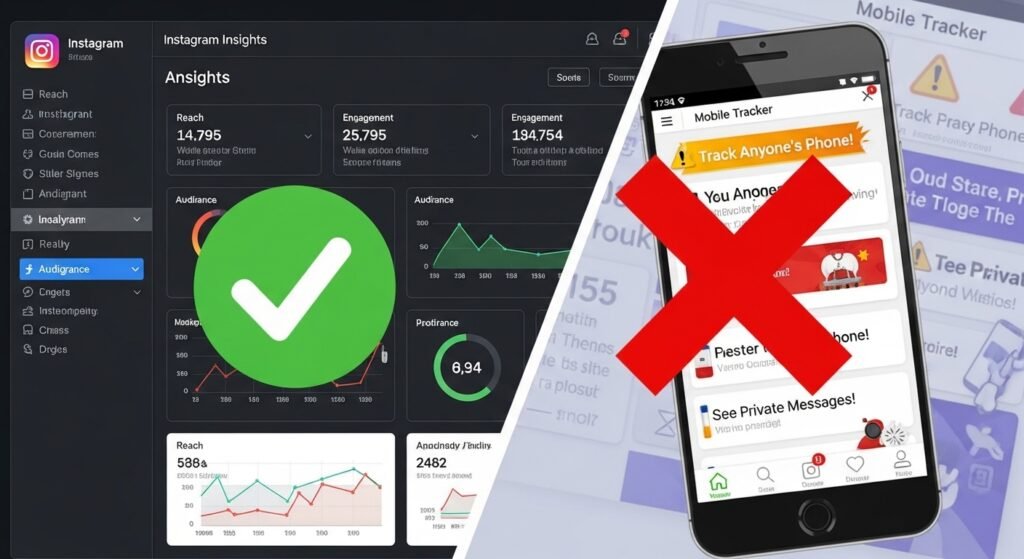
Legitimate social media management tools (like Sprout Social, Hootsuite, or Later) use the official Instagram API. They can help you organize your Instagram engagement metrics, schedule posts, and track overall share trends over months or years. However, even these approved tools cannot tell you who shared a post in a DM.
Conversely, mobile apps that explicitly advertise “See Who Shared Your Post” or “Find Hidden Stalkers” are dangerous scams.
- Fact: Instagram does not allow external software to access private message data.
- Risk: Downloading these apps and logging in will likely result in your data being stolen, or your account being permanently banned for violating the Terms of Service.
Why Can’t I See Who Shared My Instagram Post? (Troubleshooting)
If you are looking at your screen and wondering why the data is missing, here are the factual reasons why you cannot see the shares:
- The Private Account Block: You can only see Story reshares from a public Instagram account. If a user with a private profile shares your post to their Story, their identity remains hidden to protect their privacy.
- The 24-Hour Expiration: You missed the window. The Story vanished, taking the “View Story Reshares” data with it.
- They Used the Copy Link Feature: Instead of using the native share tools, they copied the URL and texted it to someone.
- Personal Account Limitations: You cannot view your total share count because you have not switched from a personal profile to a Creator account.
Frequently Asked Questions
Can you see who shared your Instagram Reel to their Story?
Yes, you absolutely can. The process is identical to a standard photo post. Open your Reel, look for the “View Story Reshares” option, and tap it to see the active Stories currently featuring your video.
How to check who shared your Instagram post link?
It is impossible to see the identity of someone who copied your post link. You can only see the numeric action recorded as a share inside your Professional Dashboard under the paper airplane icon.
What happens if I delete a post that someone shared?
If someone shares your post to their Story, and you subsequently delete your original post from your grid, the content will automatically disappear from their Story as well. It will be replaced with a message stating “Post Unavailable.”
Can I stop people from sharing my content?
Yes. If you value absolute privacy, you can disable sharing. Go to your Instagram Settings, tap on “Sharing and remixes,” and toggle off the “Allow story sharing” and “Allow remixes” options.
By leveraging the Professional Dashboard, monitoring your 24-hour Story reshares, and understanding the undeniable power of Dark Social traffic, you now have the tools to track your reach like an absolute expert. Stop worrying about the hidden names in DMs, and start focusing on the total share count to skyrocket your Instagram growth.
Go to Sac Biz News for more quality, informative content.